How to Verify an ICC-ES Evaluation Report Before Approving a Product
A supplier sends a technical submittal stating:
Code compliance: ICC-ES ESR-1234
Procurement searches the report number, finds ESR-1234 in the ICC-ES directory and marks the evidence:
ICC-ES review rule: finding the ESR is only the first gate. Confirm the report holder, evaluated product, code / technical scope, conditions of use, installation requirements and product identification before treating the evidence as applicable to the proposed project use.
Verified.
That is only the first step.
ICC-ES describes an Evaluation Report, or ESR, as the result of a technical evaluation of a building product against applicable building-code requirements. Its reports can contain information about the evaluated product, applicable codes or acceptance criteria, installation requirements, conditions of use and product identification.
For procurement, the real question is:
Does this ESR actually support the exact product and project application being proposed?
A practical verification workflow is:
Supplier Provides ESR
↓
Find Official Report
↓
Confirm Report Holder
↓
Confirm Evaluation Subject
↓
Review Code / Evaluation Scope
↓
Review Conditions of Use
↓
Check Installation Requirements
↓
Check Product Identification
↓
VERIFIED FOR PROPOSED USE
Evidence supports the reviewed application.
HOLD / CLARIFY
Applicability remains unclear.
NOT SUPPORTED
The report does not support the proposed product or use.
The core rule is:
ESR Exists ≠ Proposed Product Covered
When Should Procurement Check an ICC-ES Report?
Use this workflow when a supplier provides:
- an ESR number;
- an ICC-ES Evaluation Report;
- a datasheet referencing ICC-ES;
- a code-compliance claim based on an ESR;
- a material submittal using an ESR as technical evidence.
ICC-ES maintains a public Reports Directory where evaluation reports can be searched and reviewed.
A typical supplier statement might be:
“Complies with IBC requirements — see ESR-XXXX.”
The procurement task is not merely to confirm that ESR-XXXX exists.
It is to determine:
What exactly does ESR-XXXX evaluate, and does that evaluation apply to this proposed product?
Step 1: Record the Supplier's Claim
Before opening the report, capture the information the supplier expects the ESR to support.
| Field | Supplier Evidence |
|---|---|
| ESR | ESR-1234 |
| Manufacturer | ABC Products |
| Product | Anchor X |
| Model | X100 |
| Claimed Use | Concrete anchoring |
| Code Claim | IBC |
| Installation | Method A |
Record:
- ESR Number
- Supplier
- Manufacturer
- Product Name
- Model / Series
- Intended Application
- Claimed Code
- Technical Standard
- Proposed Installation
This prevents the review from becoming:
“I found the report, therefore everything is fine.”
Know the supplier's claim before checking whether the report supports it.
Step 2: Find the Official ESR
Search the official ICC-ES Reports Directory.
Treat ICC-ES verification as one focused evidence check inside the wider Construction Product Certification for Procurement workflow.
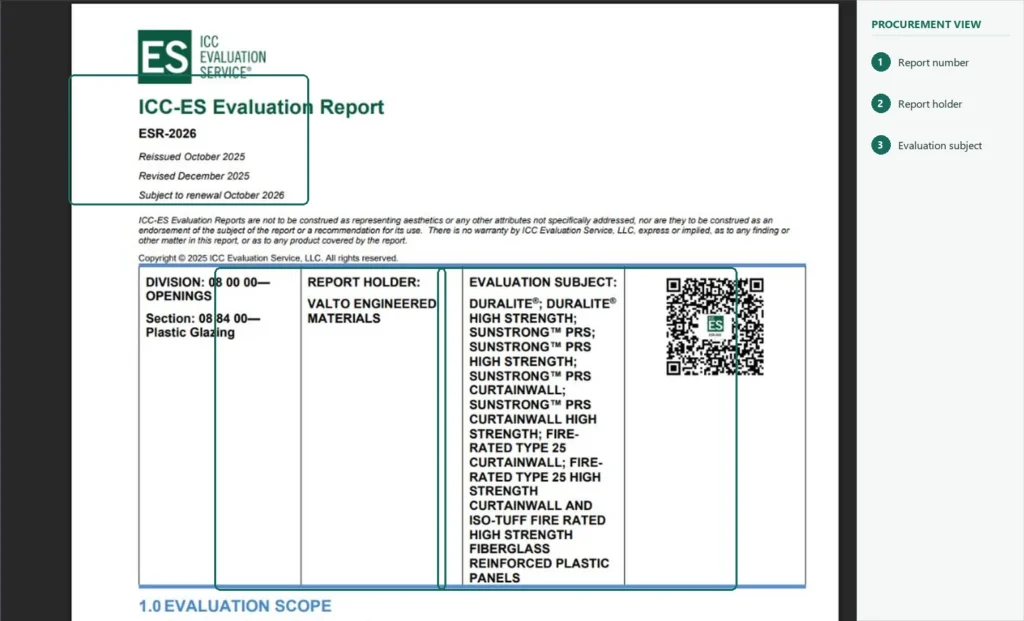
Where an ESR number is available, use it first.
REPORT FOUND
Continue to the report-content review.
REPORT NOT FOUND
Use:
HOLD
Do not immediately label the document fraudulent.
Possible explanations include:
- incorrect ESR number;
- typing error;
- outdated supplier documentation;
- another report reference;
- supplier misunderstanding.
Ask the supplier to clarify the evidence before accepting it.
Step 3: Confirm the Report Holder
Locate the report holder in the ESR.
Then compare it with the proposed supplier or manufacturer.
| Supplier Evidence | ICC-ES Report | Result |
|---|---|---|
| ABC Products | ABC Products | PASS |
| ABC Trading | XYZ Manufacturing | CLARIFY |
But sometimes:
| Supplier EvidenceICC-ES ReportResult | ||
|---|---|---|
| ABC Trading | XYZ Manufacturing | CLARIFY |
The difference does not automatically mean the evidence is wrong.
There may be a legitimate:
- distributor relationship;
- private-label arrangement;
- OEM relationship;
- related company.
But procurement should understand why the supplier is relying on another company's evaluation report.
Decision Rule
Relationship clear and product traceable
→ Continue.
Relationship unclear
→ HOLD
Report-holder identity is one verification layer, not the final product check.
Step 4: Confirm the Evaluation Subject
Next determine which product the report actually evaluates.
ICC-ES reports are product-specific technical evaluations, so the buyer should compare the report's evaluated product or product family with the exact product being submitted.
Check:
- Product Name
- Product Family
- Model
- Series
- Configuration
- Product Description
For example:
ESR Covers
X100 Series
Supplier Proposes
X500
Do not assume X500 is covered simply because the manufacturer owns the report.
Status:
HOLD / NOT SUPPORTED
until the supplier demonstrates that the proposed model falls within the ESR.
Report Holder Match ≠ Product Match
Step 5: Review the Code and Evaluation Scope
An ESR explains the code requirements, acceptance criteria or other technical basis used to evaluate the product. ICC-ES specifically notes that its reports identify the code requirements or acceptance criteria used in the evaluation.
If code scope, intended use or technical basis affects supplier compliance, record the finding in the Technical Bid Evaluation Template rather than leaving it only inside the ESR review notes.
Record:
- Applicable Code
- Code Edition
- Acceptance Criteria
- Referenced Standard
- Evaluated Application
- Product Function
Then compare these against the project.
| Item | Project Requirement | ESR | Result |
|---|---|---|---|
| Code | Required edition | Listed edition | PASS / REVIEW |
| Intended Use | Application A | Application A | PASS |
| Technical Basis | Required | Listed | PASS |
Do not treat an ESR as:
Universal approval for every project and every jurisdiction.
The report supports the scopes actually evaluated.
What If the Code Edition Is Different?
Suppose the project requires one code edition while the ESR references another.
Do not automatically mark:
FAIL
Instead use:
HOLD / TECHNICAL REVIEW
Check whether:
- the ESR also covers the required edition;
- a current report revision exists;
- the authority having jurisdiction accepts the evidence;
- a technical equivalency review is required.
Procurement should identify the discrepancy.
The responsible technical or code authority should determine whether it is acceptable.
Step 6: Read the Conditions of Use
This is one of the most important parts of the report.
ICC-ES explains that ESRs include Conditions of Use, which state the conditions under which the evaluated product complies with, or is considered a suitable alternative to, the applicable code requirements.
Depending on the product, these conditions may address:
- permitted applications;
- substrates;
- design limits;
- loads;
- environmental exposure;
- assembly requirements;
- engineering responsibilities;
- restrictions;
- additional approvals.
Do not ask only:
“Is Product X in the ESR?”
Also ask:
Is our proposed use of Product X inside the ESR's conditions?
Use:
CONDITION SATISFIED
→ PASS
CONDITION UNCLEAR
→ HOLD
CONDITION NOT MET
→ NOT SUPPORTED FOR THIS USE
A product can therefore be covered by an ESR but still be unsuitable for a specific project application.
Step 7: Check the Installation Requirements
A product's evaluated performance may depend on how it is installed.
ICC-ES states that ESRs provide installation requirements to help confirm that the product is installed in accordance with applicable code requirements or acceptance criteria.
Review requirements such as:
- Fastener Type
- Fastener Spacing
- Anchor Depth
- Substrate
- Adhesive
- Assembly Method
- Manufacturer Instructions
- Special Inspection
- Other Installation Restrictions
Then compare with:
- Shop Drawings
- Method Statement
- Supplier Installation Proposal
- Project Details
Example:
ESR
Installation:
Method A
Project Submittal
Installation:
Method B
Status:
HOLD
The report may support the product only when the required installation method is followed.
ESR verification should review Product + Installation, not Product alone.
Step 8: Check Product Identification
Procurement also needs to know how the evaluated product can be identified when it arrives on site.
Carry the approved ESR identification criteria into Material Receiving Inspection so the delivered product can be checked against the exact item and marking approved during submittal.
ICC-ES notes that its reports include information on how the evaluated product should be identified.
Look for:
- Manufacturer Name
- Product Name
- Model / Series
- Packaging Mark
- ESR Number
- Label
- Other Traceability Information
This creates an important link between approval and receiving.
At submittal stage:
What product has been approved?
At delivery stage:
Does the material received match the identification described in the ESR and approved submittal?
That turns the ESR into a useful procurement control beyond the initial document review.
Supplier Product vs ESR Matrix
Use one working table to complete the verification.
| Verification Field | Supplier Submittal | ICC-ES Report | Status |
|---|---|---|---|
| ESR Number | ESR-1234 | ESR-1234 | PASS |
| Report Holder | ABC | ABC | PASS |
| Product / Series | X100 | X100 Series | PASS |
| Applicable Code | Required code | Listed | PASS |
| Intended Use | Application A | Application A | PASS |
| Conditions | Project compliant | Defined | PASS |
| Installation | Method A | Method A | PASS |
| Identification | Matches | Defined | PASS |
| Final Status | VERIFIED / HOLD |
This is more useful than a simple:
ESR Found ✓
Use a Three-Status Procurement Result
VERIFIED FOR PROPOSED USE
Use when:
- the official ESR is found;
- report-holder relationship is clear;
- exact product or series is covered;
- relevant evaluation scope aligns;
- conditions of use are satisfied;
- proposed installation is consistent;
- product identification is traceable.
HOLD / CLARIFY
Use when:
- report-holder relationship is unclear;
- model coverage is uncertain;
- code edition differs;
- conditions require interpretation;
- installation differs;
- identification cannot be established.
NOT SUPPORTED
Use when:
- the proposed product is clearly outside the ESR;
- the application is outside the evaluated scope;
- required conditions cannot be satisfied;
- supplier evidence materially conflicts with the official report.
Avoid automatically writing:
Fake ESR.
A more accurate procurement conclusion is:
The reviewed ICC-ES Evaluation Report does not support the proposed product or application.
ICC-ES Report Verification Checklist
Report
- ESR number found
- Current official report reviewed
- Report holder checked
- Evaluated product identified
Product
- Manufacturer relationship clear
- Exact product / series covered
- Proposed configuration covered
Scope
- Relevant code identified
- Code edition reviewed
- Acceptance criteria / technical basis reviewed
- Intended use aligned
Conditions
- Conditions of use reviewed
- Project conditions compared
- Limitations identified
Installation
- Installation requirements reviewed
- Proposed method compared
- Special requirements identified
Identification
- Identification requirements understood
- Supplier product traceable
- Receiving criteria available
Final Status
VERIFIED FOR PROPOSED USE
HOLD / CLARIFY
NOT SUPPORTED
ICC-ES Verification Decision Gate
Supplier Provides ESR
Add the required ESR number, product / series, conditions and installation evidence to the Construction Material Submittal Checklist before formal issue.
↓
Official Report Found?
NO
→ HOLD
YES
↓
Report Holder / Relationship Clear?
NO
→ CLARIFY
YES
↓
Exact Product / Series Covered?
NO
→ NOT SUPPORTED
UNCLEAR
→ HOLD
YES
↓
Relevant Evaluation Scope Matches Project?
NO / UNCLEAR
→ TECHNICAL REVIEW
YES
↓
Conditions of Use Satisfied?
NO
→ NOT SUPPORTED FOR THIS USE
YES
↓
Installation Requirements Matched?
NO
→ HOLD / Revise Installation
YES
↓
Product Identification Consistent?
NO
→ HOLD
YES
↓
ICC-ES REPORT CHECK PASSED
ESR Verification Does Not Mean Final Project Approval
ICC-ES explains that evaluation reports provide evidence that a building product complies with applicable code requirements and can help code officials and the building industry determine product acceptance.
A supported ESR should move into the Construction Material Submittal Process and then the Material Approval Register after formal approval.
That does not mean procurement should write:
ICC-ES approved this product for our project.
A more accurate conclusion is:
The reviewed ESR supports the proposed product for the reviewed scope and conditions.
Formal project approval may still depend on:
- Project Specification
- Consultant Review
- Authority Having Jurisdiction
- Shop Drawings
- Other Certifications
- Samples
- Installation Details
- Other Submittal Requirements
The wider workflow remains:
ESR Verification
↓
Project Specification Review
↓
Complete Material Submittal
↓
Formal Technical Approval
↓
PO / Production Release
Common ICC-ES Verification Mistakes
Checking Only That the ESR Number Exists
Read what the report actually covers.
Stopping at the Report Holder
Verify the evaluated product.
Assuming Every Product From the Manufacturer Is Covered
Check exact product or series.
Ignoring Code Scope
Compare the ESR with project requirements.
Ignoring Conditions of Use
Product coverage can be conditional.
Ignoring Installation Requirements
Evaluated performance may depend on the specified installation.
Ignoring Product Identification
Receiving needs to confirm the delivered item is the evaluated product.
Treating ESR Verification as Final Material Approval
Return the evidence to the wider project-approval workflow.
ICC-ES Verification Record
Keep a dated record.
| Field | Record |
|---|---|
| Supplier | ABC Products |
| Product | Product X |
| Model / Series | X100 |
| ESR | ESR-1234 |
| Review Date | — |
| Report Holder | — |
| Evaluated Product | — |
| Code / Edition | — |
| Conditions Reviewed | Yes / No |
| Installation Reviewed | Yes / No |
| Identification Reviewed | Yes / No |
| Final Status | Verified / Hold / Not Supported |
| Reviewer | — |
| Notes | — |
This is much stronger than recording only:
ICC-ES checked.
Where ICC-ES Verification Fits in Procurement
The practical workflow is:
Supplier Product Proposed
↓
Supplier Provides ESR
↓
Verify ICC-ES Evaluation Report
↓
Exact Product + Scope + Conditions Supported?
NO
→ HOLD
YES
↓
Compare With Project Specification
↓
Complete Other Compliance Evidence
↓
Material Submittal
↓
Formal Material Approval
↓
PO / Production Release
Then, when the product arrives:
Approved ESR Identification
↓
Receiving Inspection
↓
Confirm Delivered Material Matches Approved Product
Build Procurement Hub organizes ICC-ES reports, building-code resources, technical standards and material-approval tools around this real procurement workflow, helping buyers move from a supplier ESR claim to the official technical evidence and then back into project approval.
Verify the Product, Scope, Conditions and Installation — Not Just the ESR Number
Find the official ICC-ES report, confirm the report holder and exact evaluated product, compare the code and evaluation scope with the project, read the conditions of use, check installation requirements and keep the identification criteria available for receiving inspection.
FAQ
How do I verify an ICC-ES Evaluation Report?
Search the ESR number in the official ICC-ES Reports Directory, then review the report holder, evaluated product, code basis, conditions of use, installation requirements and product-identification information.
Does finding the ESR number prove my supplier's product is covered?
No. Confirm that the exact proposed product, model, series or configuration falls within the report's evaluated scope.
Can a product have a valid ESR but still be unsuitable for my project?
Yes. The proposed use may fall outside the report's conditions, code scope or installation requirements.
Is an ICC-ES Evaluation Report enough for final material approval?
No. It is supporting code-compliance evidence. Project specifications, technical review, other required documentation and formal approval may still apply.
The core principle is:
Do not verify an ICC-ES Evaluation Report by checking only that the ESR number exists. Confirm that the report holder, evaluated product, code scope, conditions of use, installation requirements and product identification all match the product and application you are actually reviewing.
