What to Check Before Paying a New Overseas Supplier: Pre-Payment Verification Checklist
A supplier sends an invoice and asks for payment.
The company has already passed supplier qualification, the quotation was approved and the purchase order has been issued.
It may seem that the only remaining task is:
Payment-release rule: supplier qualification does not automatically approve a payment. Reconfirm the transaction entity, invoice, beneficiary, bank instructions, milestone and required risk controls before funds leave the company.
Send the money.
But payment creates a separate transaction risk.
Before funds leave the company, procurement should confirm that the supplier entity, invoice, beneficiary, bank instructions, payment amount and commercial milestone all still match the transaction that was originally approved.
A practical pre-payment workflow is:
Payment Request Received
↓
Confirm Legal Entity
↓
Match PO / Contract / Invoice
↓
Confirm Payment Milestone
↓
Verify Beneficiary and Bank Details
↓
Investigate Any Bank Detail Change
↓
Complete Required Transaction Screening
↓
Check Previous Payments
↓
Complete Internal Approval
↓
APPROVE PAYMENT
or
HOLD / CLARIFY
or
ESCALATE
The key principle is:
Supplier Approval ≠ Automatic Payment Approval
Why Pre-Payment Verification Is a Separate Procurement Gate
Supplier qualification normally asks:
- Is this a legitimate company?
- Can it manufacture the required product?
- Does it have acceptable quality controls?
- Can it meet the specification?
- Is the commercial proposal acceptable?
Payment verification asks something different:
Is this specific request for money correct and ready to be released?
New risks can appear after supplier approval, including:
- a different invoice entity;
- a new beneficiary;
- changed bank instructions;
- wrong payment percentage;
- duplicated payment request;
- premature milestone payment;
- changed currency;
- compromised email communications.
For this reason, the payment request should pass its own control gate.
Step 1: Confirm the Legal Entity You Are Paying
Start with the transaction parties.
If the contracting, invoicing or beneficiary entities do not line up, return to the Supplier Due Diligence Checklist before releasing funds.
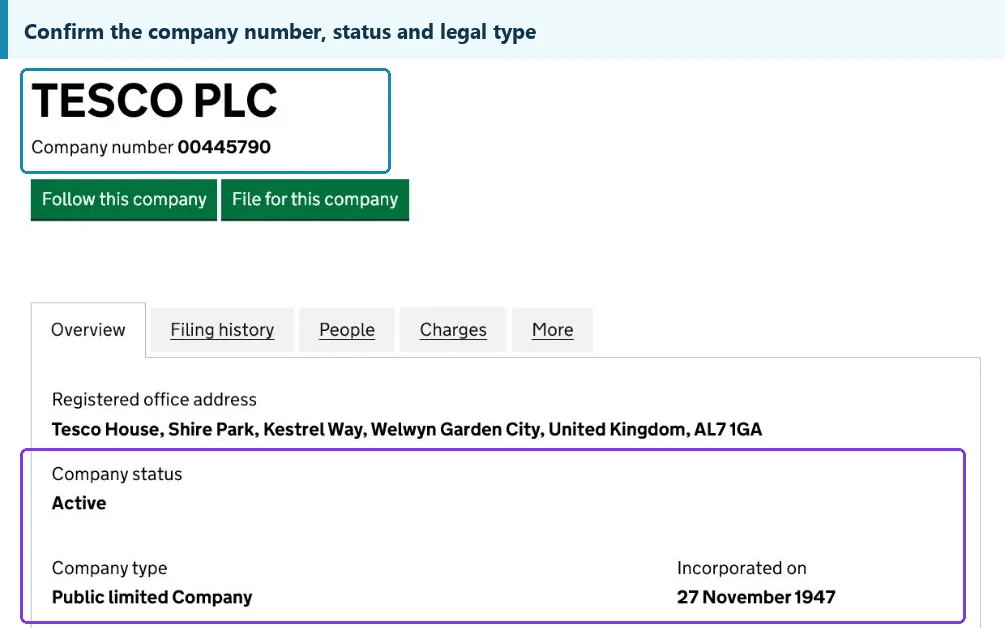
Compare:
- Approved Supplier Legal Name
- PO Entity
- Contracting Entity
- Invoice Issuer
- Payment Beneficiary
- Country
- Registered Address where relevant
A simple entity chain is:
Approved Supplier
↓
PO / Contract Entity
↓
Invoice Entity
↓
Bank Beneficiary
Ideally, the relationship between every entity is obvious.
For example:
| Document | Entity |
|---|---|
| Supplier Record | ABC Manufacturing Ltd. |
| Purchase Order | ABC Manufacturing Ltd. |
| Invoice | ABC Manufacturing Ltd. |
| Bank Beneficiary | ABC Manufacturing Ltd. |
Result:
PASS
But suppose the beneficiary is:
XYZ Trading Ltd.
Do not automatically reject the payment.
There may be a legitimate:
- group-company arrangement;
- export trading company;
- centralized treasury entity;
- parent-company payment structure.
But procurement should not guess the explanation.
Status:
HOLD
Request documentation explaining why XYZ is receiving payment for a contract with ABC.
Different Entity ≠ Automatic Fraud. Different Entity = Relationship Must Be Verified.
Step 2: Match the Invoice to the PO or Contract
Before asking where the money should go, confirm that the amount itself is correct.
Check:
- Supplier
- PO Number
- Contract Number
- Invoice Number
- Product / Service
- Quantity
- Unit Price
- Total Amount
- Currency
- Payment Terms
- Deposit / Balance Percentage
- Incoterm where relevant
Use an invoice comparison table.
| Field | PO / Contract | Invoice | Result |
|---|---|---|---|
| Supplier | ABC Ltd. | ABC Ltd. | PASS |
| PO No. | PO-1001 | PO-1001 | PASS |
| Currency | USD | USD | PASS |
| Payment Stage | 30% Deposit | 30% Deposit | PASS |
| Amount Due | USD 30,000 | USD 30,000 | PASS |
If the contract requires:
30% deposit
but the supplier invoices:
50% advance
the payment should remain on HOLD even if the bank details are perfectly correct.
Verify that the payment is commercially correct before verifying where to send it.
Step 3: Confirm That the Payment Milestone Has Been Reached
An invoice is a request for payment.
It is not necessarily proof that payment is due.
The agreed contract should determine the trigger.
Deposit Payment
Possible requirements may include:
- Signed PO
- Signed Contract
- Supplier Approval Completed
- Payment Details Verified
Production Progress Payment
Possible requirements may include:
- Production Milestone Reached
- Progress Evidence Received
- Inspection Completed
- Required Approval Documents Received
Pre-Shipment Balance
Possible requirements may include:
- Production Complete
- Pre-Shipment Inspection Passed
- Packing Evidence Received
- Agreed Shipping Documents Available
Post-Shipment Payment
Possible requirements may include:
- Bill of Lading
- Delivery Evidence
- Required Document Presentation
- Other Contractual Trigger
For every payment, ask:
What event makes this payment due, and where is the evidence that the event has occurred?
The rule is:
Invoice Received ≠ Payment Milestone Completed
Step 4: Verify the Payment Beneficiary
Now review where the money will actually go.
Record:
- Beneficiary Name
- Beneficiary Country
- Bank Name
- Bank Country
- Account Number / IBAN
- SWIFT / BIC
- Currency
- Intermediary Bank where relevant
Compare these details against the approved supplier payment record.
| Field | Approved Record | Current Invoice | Result |
|---|---|---|---|
| Beneficiary | ABC Ltd. | ABC Ltd. | PASS |
| Bank | Bank A | Bank A | PASS |
| Account | ****1234 | ****1234 | PASS |
| SWIFT | ABCDXXXX | ABCDXXXX | PASS |
| Country | China | China | PASS |
A material mismatch should trigger:
HOLD
Do not change the approved record simply because the new details appear on the latest invoice.
Step 5: Create an Approved Payment Details Record
For a new supplier's first payment, create a verified payment baseline.
Record:
- Supplier Legal Name
- Approved Beneficiary
- Bank Name
- Bank Country
- Account Number / IBAN
- SWIFT / BIC
- Payment Currency
- Verification Date
- Verification Method
- Reviewer
- Approver
This becomes the:
Approved Payment Details Record
Future invoices can then be compared against a known baseline.
That is much stronger than rebuilding the bank verification process from emails every time.
Maintain an approved payment baseline and investigate changes.
Step 6: Treat Any Bank Detail Change as a New Verification Event
This is one of the most important payment controls.
Suppose a supplier writes:
“We have changed our bank account. Please send the balance to the new account below.”
Do not treat that as a normal invoice update.
Use:
Enhanced Bank Change Verification
Possible controls include:
- Do not rely solely on the email requesting the change
- Contact the supplier using previously verified contact details
- Confirm with a known supplier representative
- Use an existing verified telephone number
- Request a written explanation
- Confirm the new beneficiary relationship
- Require second internal approval
- Record who completed the verification
The important principle is:
A bank-detail change resets payment verification.
The fact that the message comes from a familiar email address does not remove the need for independent verification.
What If the New Account Belongs to a Related Company?
This can happen legitimately in international trade.
For example:
Contract Supplier
ABC Manufacturing Ltd.
New Beneficiary
ABC International Trading Ltd.
Do not automatically reject the arrangement.
But request:
- Legal Name of the Beneficiary
- Relationship to Supplier
- Reason for Payment Routing
- Supporting Company Information
- Alignment With Invoice / Contract
- Required Internal Approval
Until the relationship is understood:
HOLD
“Same owner” or “our finance company” is not enough by itself.
Procurement needs a documented transaction path.
Step 7: Recheck Transaction-Party Risk Where Required
Company policy or applicable requirements may require transaction-party screening before payment.
Use the existing Restricted Party Screening for International Suppliers workflow rather than duplicating sanctions / restricted-party logic inside the payment checklist.
Possible relevant parties include:
- Supplier
- Contracting Entity
- Invoice Issuer
- Payment Beneficiary
- Other Material Counterparty
The key question is:
Is the entity receiving the money the same entity that passed the required screening?
If the beneficiary changed from:
ABC Manufacturing
to:
XYZ Trading
the previous screening of ABC may not answer the risk question for XYZ.
Where additional screening is required:
HOLD
Complete it before releasing payment.
This step should use the company's existing restricted-party screening process rather than duplicating it inside the payment checklist.
Step 8: Check for Payment-Level Red Flags
A payment request deserves extra review when something has changed unexpectedly.
Common red flags include:
- Sudden bank-account change
- New payment beneficiary
- New bank country
- New currency
- Urgent request to bypass approval
- Different email address or domain
- Payment percentage changed
- Invoice amount changed
- Request to split payment unexpectedly
- Beneficiary unrelated to supplier
- Payment requested before milestone
- Duplicate-looking invoice
One red flag does not automatically prove fraud.
But unresolved red flags should not disappear because:
“We have already worked with the supplier for months.”
Use:
CLARIFY
when information is missing.
Use:
ESCALATE
when a material risk remains unresolved.
Step 9: Check Previous Payments and Duplicate Risk
This is a simple control that can prevent expensive mistakes.
Compare prior payment stages with Construction Purchase Order Tracking and the Construction Procurement Log when multiple invoices, deposits or balances are being managed.
Review:
- Invoice Number
- PO Number
- Invoice Amount
- Previous Deposit
- Previous Progress Payments
- Balance Outstanding
For example:
Contract Value
USD 100,000
Deposit Already Paid
USD 30,000
Correct Balance
USD 70,000
If a new supplier invoice requests:
USD 100,000
do not assume it represents the outstanding balance.
Status:
HOLD
Check the payment history first.
This is especially important when:
- several team members manage the project;
- multiple invoices exist;
- finance and procurement use different trackers;
- payments are split across milestones.
Entity & Payment Consistency Matrix
Use one working table to review the transaction.
| Verification Field | Supplier Record | PO / Contract | Invoice | Bank Details | Status |
|---|---|---|---|---|---|
| Legal Entity | ABC Ltd. | ABC Ltd. | ABC Ltd. | — | PASS |
| Beneficiary | ABC Ltd. | — | ABC Ltd. | ABC Ltd. | PASS |
| Country | China | China | China | China | PASS |
| Currency | USD | USD | USD | USD | PASS |
| Payment Terms | 30 / 70 | 30 / 70 | 30% Deposit | — | PASS |
| Amount Due | — | USD 30,000 | USD 30,000 | — | PASS |
Any critical mismatch should produce:
HOLD
not:
“Probably okay.”
Step 10: Confirm Internal Approval
The final control is internal authorization.
Depending on company policy, payment may require:
- Procurement Approval
- Project Manager Approval
- Finance Approval
- Second Approver
- Management Approval for New Supplier
- Bank-Change Approval
- Exception Approval
Do not allow:
“The supplier needs payment today.”
to become an alternative approval process.
Urgency may change how quickly the team reviews the payment.
It should not remove the controls.
Urgency does not equal approval.
Pre-Payment Verification Checklist
Supplier Identity
- Supplier legal entity confirmed
- Contracting entity confirmed
- Invoice issuer confirmed
- Beneficiary relationship confirmed
Commercial
- PO / contract matches
- Product / quantity matches
- Amount correct
- Currency correct
- Payment terms correct
- Payment milestone reached
- Previous payments checked
Banking
- Beneficiary verified
- Bank name verified
- Account / IBAN verified
- SWIFT verified
- Bank country reviewed
- Current details match approved baseline
Change Control
- Any payment-detail change identified
- Independent verification completed
- Additional approval completed where required
Risk
- Required transaction-party screening complete
- New beneficiary screened where required
- Red flags resolved
Approval
- Supporting evidence complete
- Procurement approval complete
- Finance approval complete
- Second approval complete where required
Final Status
APPROVE PAYMENT
HOLD / CLARIFY
ESCALATE
Pre-Payment Decision Gate
Payment Request Received
↓
Supplier / PO / Invoice Entities Consistent?
NO
→ HOLD
YES
↓
Amount + Currency + Payment Terms Correct?
NO
→ HOLD
YES
↓
Required Payment Milestone Reached?
NO
→ DO NOT PAY YET
YES
↓
Beneficiary + Bank Details Verified?
NO
→ HOLD
YES
↓
Bank Details Changed?
YES
→ INDEPENDENT ENHANCED VERIFICATION
NO
→ Continue
↓
Required Transaction Screening Complete?
NO
→ COMPLETE SCREENING
YES
↓
Previous / Duplicate Payment Checked?
NO
→ CHECK FIRST
YES
↓
Internal Approval Complete?
NO
→ HOLD
YES
↓
APPROVE PAYMENT
When Should Procurement Escalate?
Use escalation rather than normal clarification when:
- beneficiary ownership cannot be explained;
- supplier refuses independent bank verification;
- payment instructions change repeatedly;
- bank country changes unexpectedly;
- supplier asks procurement to bypass controls;
- required screening produces unresolved concerns;
- invoice and contract entities materially conflict;
- payment request appears compromised;
- the contractual milestone is disputed.
The distinction is:
CLARIFY
Missing or inconsistent information needs explanation.
ESCALATE
A material unresolved risk requires higher-level review.
Pre-Payment Verification Does Not Replace Supplier Qualification
This checklist does not determine whether:
Supplier approval should already have been established through the Supplier Qualification Workflow; this page controls the separate payment-release decision.
- the supplier has sufficient production capacity;
- quality systems are adequate;
- product certificates are valid;
- technical performance is acceptable;
- the supplier is financially strong.
Those questions belong earlier in supplier qualification.
Pre-payment verification asks a much narrower question:
Is this specific payment request ready and safe to release against the approved transaction?
Common Pre-Payment Verification Mistakes
Checking Only the Bank Account
The commercial payment itself may be wrong.
Assuming Invoice Entity Equals Approved Supplier
Verify it.
Paying a Different Beneficiary Without Explanation
Clarify the relationship.
Accepting Bank Changes Through Email Alone
Verify independently.
Ignoring the Payment Milestone
An invoice is not the milestone.
Forgetting Earlier Payments
Check deposit and balance history.
Assuming Supplier Qualification Approved the Payment
Every payment remains a transaction-level decision.
Allowing Urgency to Override Controls
Payment speed should not replace verification.
Pre-Payment Verification Record
Keep a dated payment-control record.
| Field | Record |
|---|---|
| Supplier | ABC Manufacturing |
| PO / Contract | PO-1001 |
| Invoice | INV-1001 |
| Invoice Amount | — |
| Payment Stage | Deposit / Progress / Balance |
| Beneficiary | — |
| Bank | — |
| Bank Details Changed? | Yes / No |
| Verification Method | — |
| Risk Screening Status | — |
| Milestone Status | — |
| Previous Payments Checked | Yes / No |
| Procurement Approval | — |
| Finance Approval | — |
| Final Status | Approve / Hold / Escalate |
| Reviewer | — |
| Verification Date | — |
This gives procurement and finance a clear record of why funds were released.
Where Pre-Payment Verification Fits in Procurement
The wider workflow is:
After a compliant payment is released, downstream schedule and delivery follow-up can continue through Procurement Expediting where required.
Supplier Sourced
↓
Supplier Due Diligence
↓
Supplier Qualification
↓
Commercial Terms Agreed
↓
PO / Contract Issued
↓
Supplier Invoice Received
↓
Pre-Payment Verification
↓
Payment Approved?
NO
→ HOLD / CLARIFY / ESCALATE
YES
↓
Funds Released
↓
Production / Shipment / Delivery
For later milestone payments:
Milestone Reached
↓
New Invoice
↓
Repeat Relevant Pre-Payment Checks
Payment verification should therefore be treated as a repeatable procurement control, not a one-time supplier onboarding task.
Tools and Resources for Pre-Payment Verification
Useful procurement resources may include:
- Company Registries
- Supplier Verification Tools
- Restricted Party Screening Resources
- Supplier Qualification Records
- PO / Invoice Comparison Templates
- Payment Approval Checklists
- Procurement Logs
- Document Verification Tools
These resources solve different parts of the payment decision.
A company registry helps confirm the legal entity.
Restricted-party resources support required transaction screening.
PO and invoice records verify the commercial amount.
An approved bank-details record helps detect changes.
Build Procurement Hub organizes these resources around the actual payment-release workflow so buyers can move from a supplier invoice to the correct verification tools before funds leave the company.
Verify the Transaction Before Funds Leave the Company
Confirm the legal entity, PO / contract, invoice, payment milestone, beneficiary and bank details, independently verify any bank-detail change, complete required transaction screening, check previous payments and finish internal approval before releasing funds.
FAQ
What should I verify before paying a new overseas supplier?
Confirm the supplier legal entity, PO or contract, invoice, beneficiary, bank details, payment amount, agreed terms, required transaction screening and payment milestone before releasing funds.
Is it safe to pay if the beneficiary name differs from the supplier name?
Not automatically. A different beneficiary may have a legitimate commercial relationship, but that relationship should be verified and documented before payment.
What should I do if a supplier changes its bank account?
Treat the change as a new verification event. Independently confirm the payment instructions using previously verified contact information and complete any required additional approvals.
Does receiving a supplier invoice mean payment is due?
No. The invoice should match the commercial agreement, and the contractual payment milestone should have been reached before funds are released.
The core principle is:
Do not release payment simply because the invoice and bank details look legitimate. Confirm that the legal entity, invoice, beneficiary, payment instructions and commercial milestone all match the approved transaction, and independently verify any change in payment details before funds are released.
